terminal-notifier for coding agents
How to wire terminal-notifier to a Claude Code or Codex run on macOS, why the banner often never appears, and where a one-shot notification stops being the right tool.
❯ claude
● Reading docs/licensing.md
⎿ Read 240 lines
⎿ Grepped "claimToken" (11 files)
● Wiring the license claim endpoint
⎿ Edited lib/license/store.ts (+38 −6)
⎿ Edited app/api/license/claim/route.ts (+21 −3)
⎿ Ran npm test (42 passed)
● Run npm run db:migrate?
❯ 1. Yes 2. No, tell Claude what to do
waiting for your approval
terminal-notifier posts a native macOS banner from the command line. Install it, chain it onto a long command, walk away.
brew install terminal-notifier
claude -p "run the full test suite"; terminal-notifier -title "Claude" -message "done"
For a single run you're waiting on, that's the whole job, and nothing here is going to talk you out of it.
When the banner never appears
terminal-notifier ships as an application bundle rather than a plain binary, because macOS won't let a Foundation tool post a user notification. The practical consequence catches almost everyone: it gets its own row in System Settings, Notifications, separate from your terminal, and that row has to be allowed. Focus and Do Not Disturb suppress it too, without any error.
So when the command runs clean and nothing shows up, check those two before touching the script.
You can also borrow another app's identity, which makes clicking the banner useful:
terminal-notifier -title "Claude" -message "done" -sender com.apple.Terminal
Use the hook, not the exit code
Chaining on ; fires when the process exits. For an interactive session that's the wrong moment. Claude Code stops and waits for you a dozen times before it exits: permission prompts, questions, plan reviews. A Notification hook fires at each of those instead:
{
  "hooks": {
    "Notification": [
      {
        "hooks": [
          {
            "type": "command",
            "command": "terminal-notifier -title 'Claude Code' -message 'needs you'"
          }
        ]
      }
    ]
  }
}
That's a genuine improvement over the exit-code version and it's where most people's setup ends up.
The ceiling
It's the same ceiling every notification tool hits. A banner is an event, not a status.
Run four agents and the message above fires four times with identical text. Which project? Which branch? Which one is still waiting versus already answered? None of that is in the banner, and you can't put it there, because the hook doesn't know either. Miss one while you're heads-down and Notification Center hands you a row that says "needs you" with no way back to the session.

AgentNotch reads session state directly instead of reacting to an event, so a waiting session stays marked. Each row carries the project, the branch, the agent, and which app it's running in, and clicking one jumps to that terminal tab.
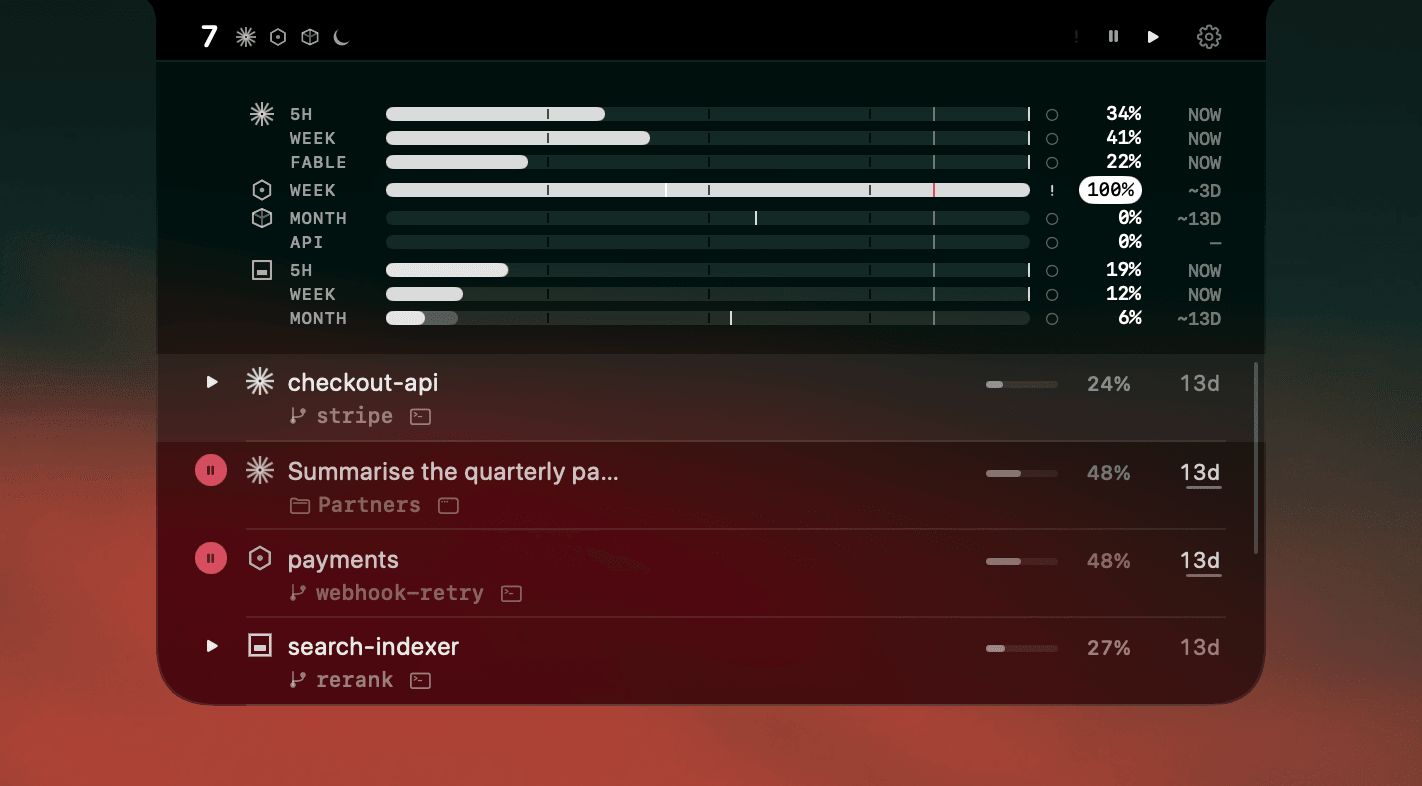
Different layers. Keep your banners for scripted one-shots. The live status is the part you can't script.
Side by side
| terminal-notifier | AgentNotch | |
|---|---|---|
| What it is | A CLI that posts one macOS banner. You script when it fires. | A menu-bar app that keeps live agent status on screen. |
| Setup per agent | You wrap each command yourself, per project, per shell. | None. It reads running sessions directly. |
| After you miss it | Gone. Notification Center keeps a copy with no session detail. | Still marked. The state persists until you act on it. |
| Tells sessions apart | Only if you write distinct text into every call. | Yes, by project, branch, agent and host app. |
| Context and plan usage | No. A banner is one line of text. | Yes, a context gauge and plan meter per session. |
| Price | Free, open source. | One-time $9.99, 14-day trial, no card. |
Questions
- How do I use terminal-notifier with Claude Code?
- Install it with 'brew install terminal-notifier', then chain it onto the command: 'claude -p "run the tests"; terminal-notifier -title "Claude" -message "done"'. For interactive sessions a Claude Code Notification hook is a better fit, since it fires when Claude actually wants you rather than when the process exits.
- Why is terminal-notifier not showing notifications on macOS?
- It ships as an application bundle, so it has its own entry in System Settings, Notifications, and that entry has to be allowed. Focus and Do Not Disturb also suppress it silently. Check both before assuming the command failed.
- Can terminal-notifier tell me which agent needs me?
- Only if you write that into the message yourself, per call. It has no knowledge of the agent, the session, or the project, so with several agents running every banner looks the same unless you build the distinction by hand.
- Does AgentNotch replace terminal-notifier?
- No. terminal-notifier sends pings you script and AgentNotch shows ongoing status you cannot script. Keep both if scripted banners already work for you.
Keep reading
See which agent needs you.
Try AgentNotch free for 14 days, no card. Watch Claude Code, Cursor, and Codex from your Mac's menu bar.
Updated 2026-09-19