Claude Code notifications in Ghostty
Ghostty is one of three terminals where Claude Code notifications work out of the box. How they work, how to test them, and what to do when a banner is not enough.
❯ claude
● Reading docs/licensing.md
⎿ Read 240 lines
⎿ Grepped "claimToken" (11 files)
● Wiring the license claim endpoint
⎿ Edited lib/license/store.ts (+38 −6)
⎿ Edited app/api/license/claim/route.ts (+21 −3)
⎿ Ran npm test (42 passed)
● Run npm run db:migrate?
❯ 1. Yes 2. No, tell Claude what to do
waiting for your approval
Ghostty is one of three terminals where Claude Code notifications work with zero configuration. Kitty and iTerm2 are the other two, and iTerm2 needs a settings trip first. Everywhere else, Claude Code sends nothing at all until you change a setting.
So if you picked Ghostty, this part is already done. Run an agent, switch to another app, and a banner lands when Claude needs you.
How it actually works
Claude Code emits an OSC 9 escape sequence when it wants your attention. Ghostty turns that into a real macOS notification. The relevant Ghostty setting is desktop-notifications, which defaults to true, so there's normally nothing in your config file about it. If you inherited a config from someone else, check that it isn't set to false:
grep desktop-notifications ~/.config/ghostty/config
Test the path end to end without involving Claude Code at all:
printf '\e]9;Ghostty test\a'
Switch to another app while that runs. A banner means the whole chain works and any remaining problem is in Claude Code's settings, not Ghostty's. No banner means Ghostty doesn't have notification permission, which lives in System Settings, Notifications.
Two things that surprise people. The banner fires even when the Ghostty window is focused, which reads as a bug and isn't one. And inside tmux nothing arrives at all, because tmux swallows the sequence before Ghostty sees it. Fix that with set -g allow-passthrough on in ~/.tmux.conf, then tmux source-file ~/.tmux.conf.
Where a banner stops helping
One Ghostty window, one agent: a banner is the right tool and you can stop reading.
The trouble starts at three windows. Every banner looks the same. None of them says which project, which branch, or which of the three is still waiting, and once it fades there's nothing to go back to. You end up cycling windows to find the one that pinged, which is the exact work the notification was supposed to save.
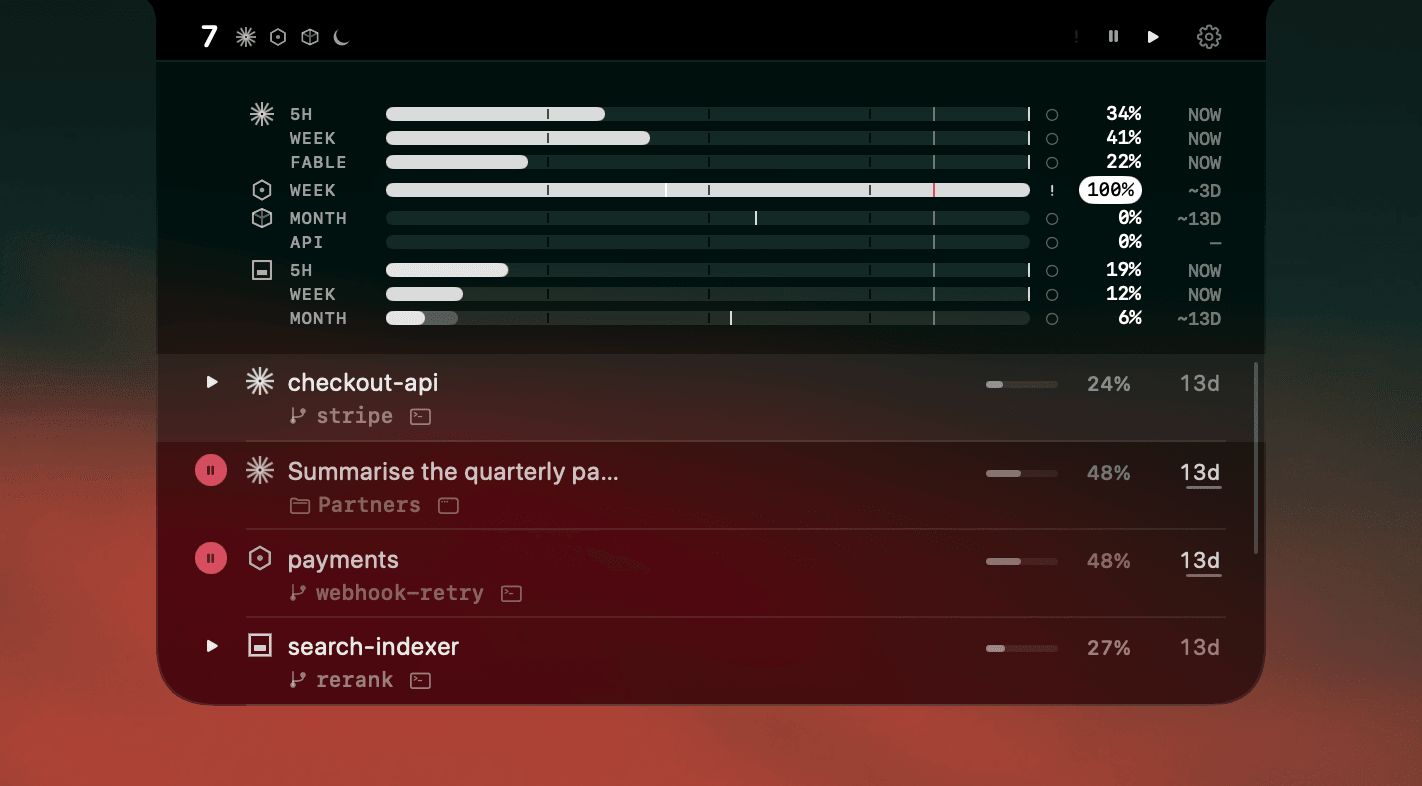
AgentNotch reads the session state itself rather than listening for terminal escape sequences, so nothing needs configuring on the Ghostty side and nothing breaks when a Ghostty or Claude Code release changes how notifications are emitted. A waiting session stays marked until you deal with it. Clicking the row jumps straight to that Ghostty tab, matched on its working directory.
Running several terminals at once
Ghostty for one project, an editor's terminal for another, Codex somewhere else: this is where naming the host earns its place. Each row shows which app the session is running in, so "the one that needs me is in Ghostty" is readable at a glance instead of a hunt.
Setup
Download AgentNotch, drag it to Applications, launch it. It picks up running agents with no config and no keys, in Ghostty or any other terminal. Free for 14 days, no card.
Questions
- Do Claude Code notifications work in Ghostty?
- Yes, with no setup. Ghostty is one of only three terminals (with Kitty and iTerm2) where Claude Code sends a desktop notification by default, and Ghostty forwards it to macOS Notification Center without any configuration.
- How do I test Ghostty desktop notifications?
- Run printf '\e]9;test\a' in a Ghostty window, then switch to another app while it runs. If no banner appears, check Ghostty's notification permission in System Settings, Notifications, and confirm desktop-notifications is not set to false in ~/.config/ghostty/config.
- Why do I get a Ghostty notification even when the window is focused?
- Ghostty posts the banner whenever the escape sequence arrives, including while the window is in the foreground. It is a known behaviour rather than a misconfiguration on your side.
- Does AgentNotch work with Ghostty?
- Yes. AgentNotch reads agent session state directly rather than watching the terminal, so Ghostty needs no configuration. It also names Ghostty in each row, so with several terminals open you can see which sessions are running there.
- Do Ghostty notifications work inside tmux?
- Not by default, because tmux swallows the escape sequence. Add 'set -g allow-passthrough on' to ~/.tmux.conf and run 'tmux source-file ~/.tmux.conf'.
Keep reading
See which agent needs you.
Try AgentNotch free for 14 days, no card. Watch Claude Code, Cursor, and Codex from your Mac's menu bar.
Updated 2026-09-19