Claude Code notifications not working
Claude Code only sends a desktop notification in Ghostty, Kitty and iTerm2. Here is the fix for every other terminal, plus what to check when the banner still never lands.
By Piotr Jura, creator of AgentNotch. Tested on macOS with AgentNotch v2.2.4.
❯ claude
● Reading docs/licensing.md
⎿ Read 240 lines
⎿ Grepped "claimToken" (11 files)
● Wiring the license claim endpoint
⎿ Edited lib/license/store.ts (+38 −6)
⎿ Edited app/api/license/claim/route.ts (+21 −3)
⎿ Ran npm test (42 passed)
● Run npm run db:migrate?
❯ 1. Yes 2. No, tell Claude what to do
waiting for your approval
Before you debug anything, check which terminal you're in. That one fact explains most of these reports.
Claude Code sends a desktop notification in Ghostty, Kitty and iTerm2, and nowhere else. In Warp, Apple Terminal, WezTerm, Alacritty or the VS Code and Cursor integrated terminals, nothing was ever sent. There is no broken hook to find. The feature just hasn't been switched on yet.
Find your terminal in this table
| Terminal | What arrives by default | What to do |
|---|---|---|
| Ghostty | Desktop notification | Nothing |
| Kitty | Desktop notification | Nothing |
| iTerm2 | Nothing until forwarding is on | Turn on escape-sequence alerts (below) |
| Warp | Nothing | terminal_bell or a hook |
| Apple Terminal | Nothing | terminal_bell or a hook |
| WezTerm, Alacritty | Nothing | terminal_bell or a hook |
| VS Code / Cursor terminal | Nothing | terminal_bell or a hook |
The one-line fix for most terminals
Ring the bell instead. Put this in ~/.claude/settings.json:
{
  "preferredNotifChannel": "terminal_bell"
}
That works in every terminal, including the ones that never receive a desktop notification. If your terminal profile silences the audible bell you'll get a visual bell or a dock bounce instead of a sound, which is worth knowing before you decide it failed.
iTerm2 needs two checkboxes, not one
iTerm2 receives the notification but won't forward it to Notification Center until you say so. Open Settings, then Profiles, then Terminal. Tick "Notification Center Alerts". Then click "Filter Alerts" and enable "Send escape sequence-generated alerts". Both are needed. Ticking only the first is why most iTerm2 users think this is broken.
tmux eats it
Running Claude Code inside tmux, the escape sequence never reaches the outer terminal. Add this to ~/.tmux.conf:
set -g allow-passthrough on
set -s extended-keys on
set -as terminal-features 'xterm*:extkeys'
Then tmux source-file ~/.tmux.conf to apply it without restarting the server. The passthrough line is the one that matters for notifications. The other two fix Shift+Enter while you're in there anyway.
Run your own command instead
A Notification hook fires alongside the built-in notification rather than replacing it, so it works in the terminals that get nothing:
{
  "hooks": {
    "Notification": [
      {
        "hooks": [
          { "type": "command", "command": "afplay /System/Library/Sounds/Glass.aiff" }
        ]
      }
    ]
  }
}
Swap afplay for terminal-notifier or an osascript banner if you want something visual. One warning about osascript: the banner it posts appears under "Script Editor" in System Settings, Notifications, and that entry starts switched off. People lose an afternoon to a hook that was firing correctly the whole time.
When the hook itself never runs
- Run
/hooksin the session. It prints what's actually loaded. If yours isn't listed, you edited a file this session isn't reading:.claude/settings.local.jsonbeats.claude/settings.json, which beats~/.claude/settings.json. - Check the matcher. An empty matcher fires on everything. A specific one such as
permission_promptoridle_promptfires only on that event, and a typo in it fails silently. - Run
claude --debug hooksand watch it evaluate live. - Turn off Focus. Do Not Disturb suppresses banners without telling anyone, and it's the answer more often than it should be.
Still nothing in Ghostty? Test the terminal on its own. Run printf '\e]9;test\a' from another window while Ghostty sits in the background. No banner from that means the problem is Ghostty's notification permission in System Settings, not Claude Code.
What none of this fixes
Every fix above produces the same shape of event. One ping, fired once, gone. Miss it and there's nothing left to look at.
That's fine for a single agent you're babysitting. With three or four running you get a stack of identical pings and no way to tell which session sent which, or which one is still waiting.

That gap is why I built AgentNotch. It reads session state directly and keeps it on screen while the session runs, so a waiting session stays marked rather than announcing itself once and disappearing. With several open it points at the one that needs you next, labelled by project and by which app it's running in.
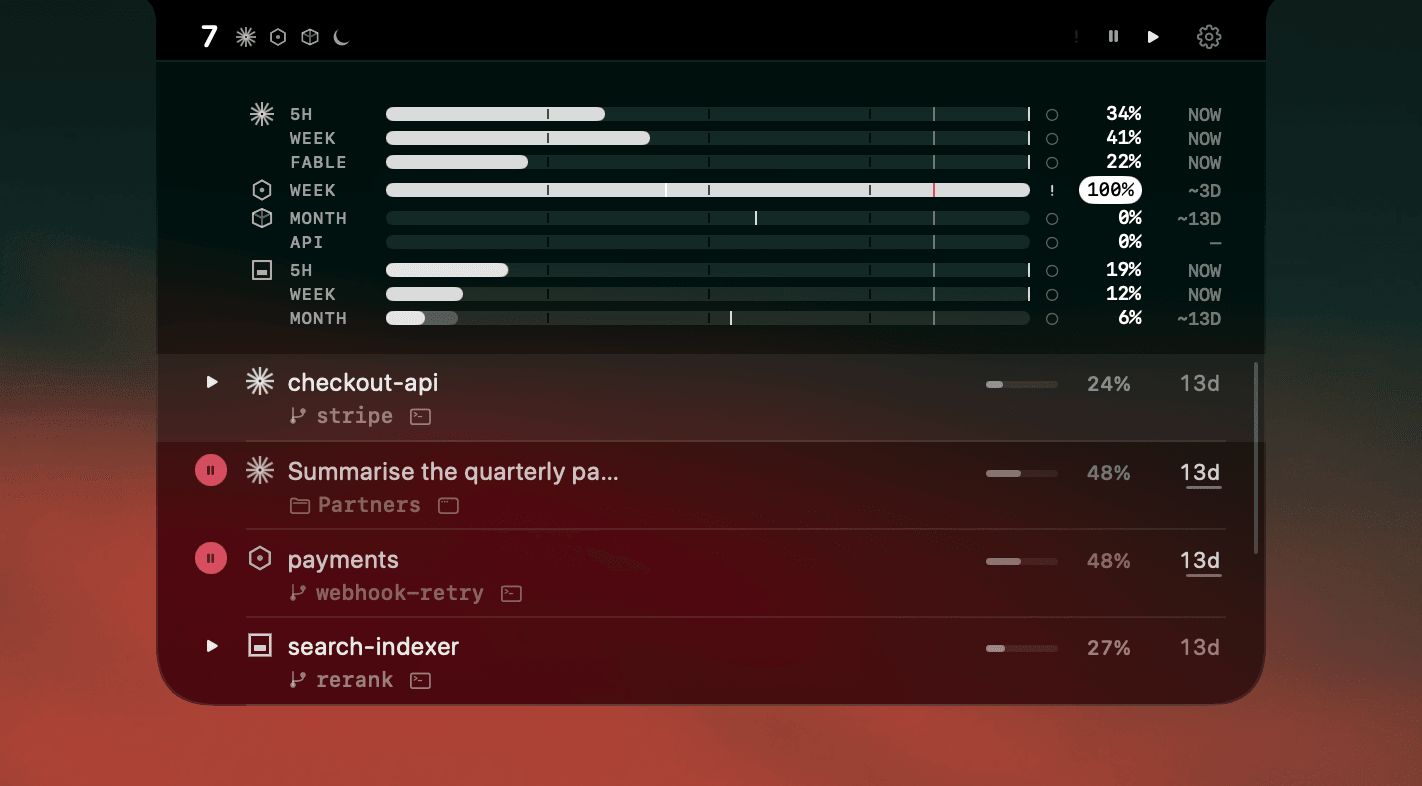
Nothing to configure, and nothing that breaks the next time Claude Code changes how it notifies. It runs entirely on your Mac and never reads your code or your keys.
Questions
- Why are my Claude Code notifications not working?
- Most often because of your terminal. Claude Code only sends a desktop notification in Ghostty, Kitty and iTerm2; everywhere else it sends nothing until you set preferredNotifChannel to terminal_bell in ~/.claude/settings.json or add a Notification hook. iTerm2 also needs escape-sequence alerts switched on before the notification reaches Notification Center.
- How do I enable Claude Code notifications?
- Add {"preferredNotifChannel": "terminal_bell"} to ~/.claude/settings.json for a bell in any terminal, or use a Notification hook to run your own command. In Ghostty and Kitty desktop notifications already work with no setup. In iTerm2 open Settings, Profiles, Terminal, tick Notification Center Alerts, then Filter Alerts and enable Send escape sequence-generated alerts.
- Why do Claude Code notifications not work in Warp or the VS Code terminal?
- Neither receives Claude Code's desktop notification, so nothing arrives by default. Set preferredNotifChannel to terminal_bell, or add a Notification hook that runs a command such as afplay /System/Library/Sounds/Glass.aiff.
- Why do Claude Code notifications stop working inside tmux?
- tmux swallows the escape sequence before it reaches the outer terminal. Add 'set -g allow-passthrough on' to ~/.tmux.conf and run 'tmux source-file ~/.tmux.conf' to apply it to the running server.
- Why is my Claude Code hook not firing?
- Usually the hook lives in a settings file the session is not reading, or the matcher does not match. Project settings in .claude/settings.json override your user settings and .claude/settings.local.json overrides both. Run /hooks in the session to see what is actually loaded.
Keep reading
See which agent needs you.
Try AgentNotch free for 14 days, no card. Watch Claude Code, Cursor, and Codex from your Mac's menu bar.
Updated 2026-07-28