How to know when Claude Code finishes
Stop fires when Claude finishes a turn, Notification fires when it needs you, and they are not the same moment. How to wire each on macOS, including per-project messages.
By Piotr Jura, creator of AgentNotch. Tested on macOS with AgentNotch v2.2.4.
❯ claude
● Reading docs/licensing.md
⎿ Read 240 lines
⎿ Grepped "claimToken" (11 files)
● Wiring the license claim endpoint
⎿ Edited lib/license/store.ts (+38 −6)
⎿ Edited app/api/license/claim/route.ts (+21 −3)
⎿ Ran npm test (42 passed)
● Run npm run db:migrate?
❯ 1. Yes 2. No, tell Claude what to do
waiting for your approval
Claude Code fires two different hooks here and picking the wrong one is why people end up with either silence or a constant drip of alerts.
Stop fires when Claude finishes responding. That's the end of a turn, and a session has many turns, so an unfiltered Stop hook pings you every time Claude stops to let you type. Notification fires when Claude actually wants you: a permission prompt, or an idle prompt after it's been sitting. For "come back, I need you", Notification is the one.
The bell, in thirty seconds
Claude Code only sends a desktop notification in Ghostty, Kitty and iTerm2. In every other terminal you get nothing until you ask for the bell:
{
  "preferredNotifChannel": "terminal_bell"
}
That goes in ~/.claude/settings.json. If your terminal profile silences the audible bell you'll get a visual flash or a dock bounce instead.
A sound when it wants you
{
  "hooks": {
    "Notification": [
      {
        "hooks": [
          { "type": "command", "command": "afplay /System/Library/Sounds/Glass.aiff" }
        ]
      }
    ]
  }
}
Ten seconds of setup and it works in every terminal, including Warp and the VS Code integrated terminal where the built-in notification never arrives.
Put the project name in the message
This is the part most setups skip, and it's what separates a useful alert from a generic one. Hooks receive a JSON payload on stdin that includes the session's working directory, so you can name the project in the banner:
#!/bin/sh
# ~/.claude/notify.sh (chmod +x this)
PROJECT=$(jq -r '.cwd' | xargs basename)
terminal-notifier -title "Claude Code" -message "$PROJECT needs you"
{
  "hooks": {
    "Notification": [
      { "hooks": [{ "type": "command", "command": "~/.claude/notify.sh" }] }
    ]
  }
}
Now three sessions produce three distinguishable banners instead of three identical ones. It's the highest-value ten minutes you can spend on hook config.
Where this stops working
You've now got a per-project banner that fires at the right moment. It still fires once.
Step away for twenty minutes and you come back to a Notification Center stack: three rows, no indication which are still waiting and which you already handled, no way to click through to the session. And a banner can't tell you an agent has been idle for eight minutes, because idleness isn't an event. Nothing fires.

AgentNotch reads session state instead of listening for events, so a finished or waiting session stays marked until you deal with it. With several open it points at the one to handle next, and clicking the row jumps into that terminal tab.
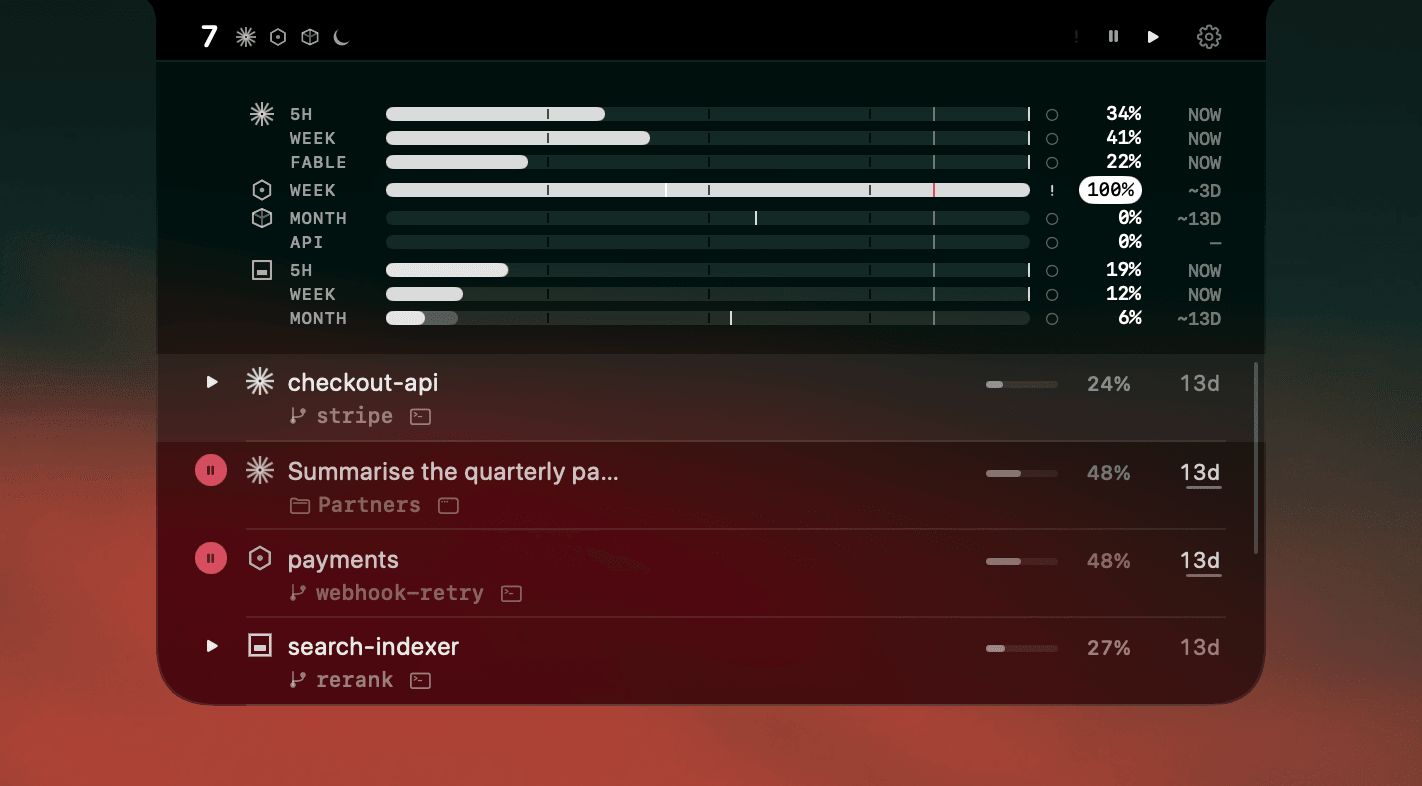
Keep the hooks. A sound is a good instant cue and nothing replaces it. The notch takes over at the point where "which one?" becomes the real question.
Side by side
| What it does | Its limit | |
|---|---|---|
| Terminal bell | Rings on notification events once preferredNotifChannel is set to terminal_bell. | Says something happened, not which session or why. |
| Notification hook | Runs any command when Claude wants you: a permission prompt or an idle prompt. | Fires on every session, so with several running the messages are identical unless you build the difference yourself. |
| Stop hook | Runs when Claude finishes responding, which is the end of a turn. | Fires on every turn, not just the last one, so an unfiltered Stop hook is noisy. |
| AgentNotch | Keeps every session's state on screen while it runs. | Flags the one that needs you next. macOS only. |
Questions
- How do I get notified when Claude Code needs input?
- Use a Notification hook. It fires when Claude Code wants your attention, with matchers for permission_prompt and idle_prompt, and can run any command including a sound or a banner. That is a different moment from the Stop hook, which fires when Claude finishes responding.
- What is the difference between the Stop hook and the Notification hook?
- Stop fires when Claude finishes a turn, which happens many times in one session. Notification fires when Claude is actively waiting on you, such as a permission prompt or an idle prompt. For 'come back to me' alerts, Notification is the one you want.
- How do I get a sound when Claude Code is done?
- Add a hook that runs 'afplay /System/Library/Sounds/Glass.aiff'. Or set preferredNotifChannel to terminal_bell in ~/.claude/settings.json for the terminal bell, which works in every terminal including the ones that receive no desktop notification.
- Can the notification say which project it came from?
- Yes. Hooks receive a JSON payload on stdin that includes the working directory, so piping it through jq lets you put the project name in the message: jq -r .cwd, then pass the basename to terminal-notifier.
- Why do I keep missing when Claude Code finishes?
- Every built-in signal fires once and disappears. With one session that is fine. With three, the pings are identical, none of them says which session, and a missed one leaves nothing to go back to.
Keep reading
See which agent needs you.
Try AgentNotch free for 14 days, no card. Watch Claude Code, Cursor, and Codex from your Mac's menu bar.
Updated 2026-07-28