See how much Claude Code usage is left
Claude Code does not show your plan limits while you work. Here is how to read what is left of the 5-hour and weekly windows on macOS.
By Piotr Jura, creator of AgentNotch. Tested on macOS with AgentNotch v2.2.4.
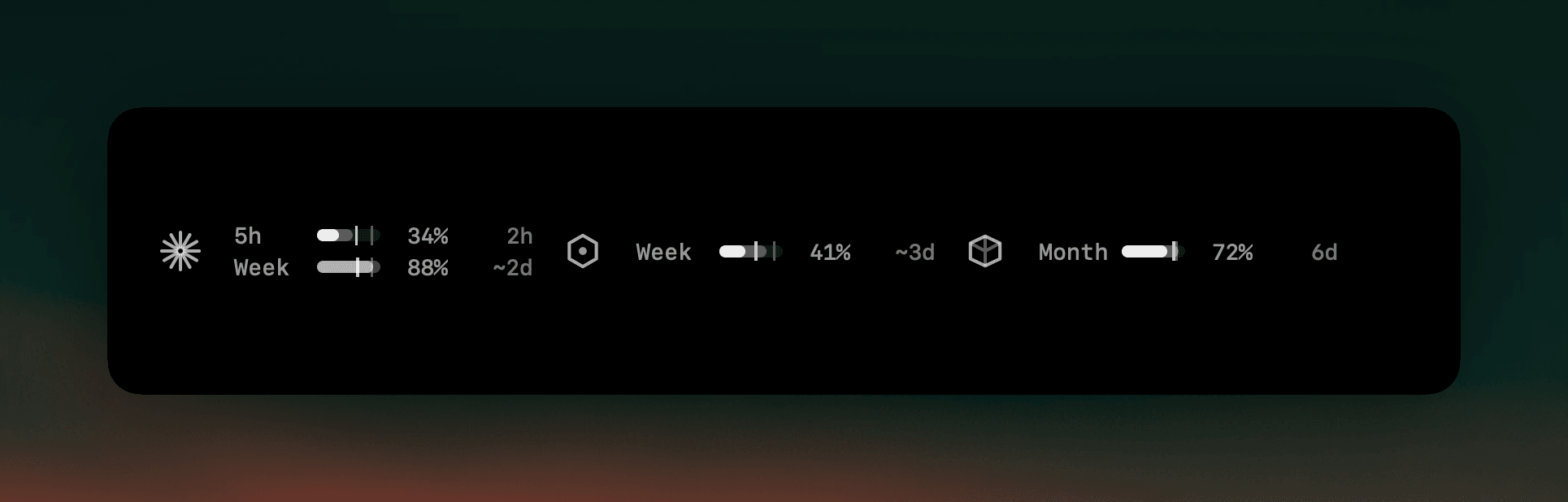
Claude Code will happily work until the moment it can't. Nothing in the terminal counts down, so the first sign that a limit exists is usually the message telling you it has been reached — often in the middle of the one task you wanted finished before lunch.
The manual answer is the Claude web app: open it, find usage, read the number, come back. It works, and nobody does it more than once or twice a day, which means the number you are working from is hours old by the time it matters.
There are two windows to keep straight, and they run out at different times. The rolling 5-hour session window is the one that interrupts work. The weekly one is the one that ends a Friday.
Where AgentNotch fits
AgentNotch keeps both windows in the macOS menu bar, next to the agents you are actually running. Each one shows what you have spent, how far through the window you are, and when it comes back — so "can I start this now?" is a glance, not a browser tab. It reads your limits with the login already on your Mac and never touches your code.
Side by side
| The question | What answers it | |
|---|---|---|
| How much of the 5-hour window is gone? | A percent per window, visible while you work. | AgentNotch, in the menu bar. |
| When does it come back? | A countdown per limit, so you know whether to wait or switch. | The same row, on the right. |
| Which limit is the tight one? | The 5-hour and weekly windows run out at different times. | Both, side by side, per provider. |
Questions
- How do I check my Claude Code usage limit?
- Claude Code does not display your plan usage while you work, so the usual answer is to open the Claude web app and look. AgentNotch reads the same limits with the login you already have and shows them in the macOS menu bar: percent used and time to reset for the 5-hour window and the week.
- What is the 5-hour limit in Claude?
- Paid Claude plans meter usage in a rolling 5-hour session window as well as a weekly one. The short window is the one that usually stops you mid-task, and it is the one people are surprised by, because nothing in the terminal counts down.
- Can I see Claude usage without opening the browser?
- Yes. AgentNotch shows the windows in the menu bar next to your running sessions, so checking costs a glance instead of a context switch.
- Does reading plan usage send my code anywhere?
- No. Plan usage is the one feature that touches the network, and it only asks your provider what your own limits are, using the login already on your Mac. Your code and prompts are never read or sent.
Keep reading
See which agent needs you.
Try AgentNotch free for 14 days, no card. Watch Claude Code, Cursor, and Codex from your Mac's menu bar.
Updated 2026-07-26